

Google Business Profile in Pakistan: Complete Setup & Optimization Guide
Learn how to create, verify and optimize a Google Business Profile in Pakistan to improve your visibility on Google Search and Maps.
 SEO & Marketing
Google Business Profile in Pakistan: Complete Setup & Optimization Guide
When someone in Lahore searches for “AC repair near me,” a family in Karachi looks for a restaurant, or a customer in Islamabad searches for a nearby dentist, Google may show local businesses directly in Search and Maps.
For a local business, being present at that moment matters.
A Google Business Profile helps eligible businesses manage how they appear on Google Search and Google Maps. You can add important information such as your location or service area, opening hours, phone number, website, photos and other business details. Customers can also leave reviews, and businesses can respond to them.
For Pakistani businesses that depend on local customers, setting up and maintaining a Google Business Profile can therefore be an important part of building an online presence.
This guide explains how Google Business Profile works, who can use it, how to set one up in Pakistan, and what you can do to make your profile more useful to potential customers.
What is a Google Business Profile?
Google Business Profile is a free tool from Google that allows eligible businesses to manage information that appears about them on Google Search and Google Maps.
You may still hear people call it Google My Business or GMB. Google My Business was the previous name; today, the service is called Google Business Profile.
A Business Profile can help customers quickly find information such as:
Your business name
Business category
Address or service area
Opening hours
Phone number
Website
Photos and videos
Products or services, where available
Customer reviews
Other business attributes
For a customer deciding where to eat, shop, book a service or make an enquiry, this information can reduce the effort required to understand and contact a business.
Is Google Business Profile free in Pakistan?
Yes. Google allows eligible businesses to add or claim a Business Profile at no charge.
You do not need to run Google Ads to create a Business Profile.
Google Business Profile and Google Ads are separate services. You may choose to advertise your business through Google Ads, but paying for advertising is not a requirement for creating or maintaining an eligible Business Profile.
Which Pakistani businesses can create a Google Business Profile?
Not every type of business is eligible.
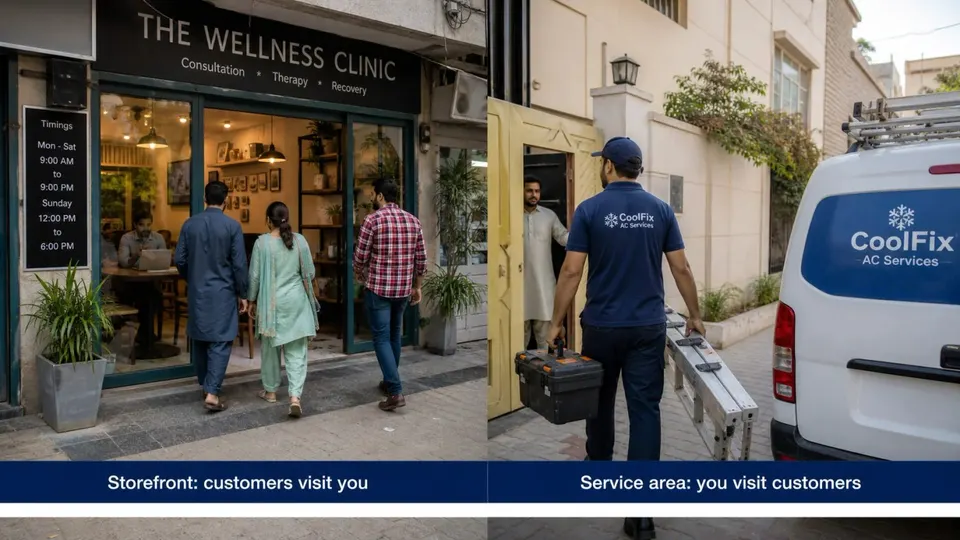
According to Google's Business Profile eligibility guidelines, a business generally needs to make in-person contact with customers during its stated hours.
This means eligibility is particularly relevant to two common types of businesses.
Storefront businesses
These are businesses where customers visit a physical location.
Examples include:
Restaurants
Cafés
Salons
Clinics
Retail shops
Bakeries
Gyms
Workshops
Pharmacies
Grocery stores
If customers can genuinely visit your location during your stated opening hours, your address can generally be displayed on the profile, subject to Google's guidelines.
Service-area businesses
Some businesses do not serve customers at a shop or office. Instead, they travel to the customer's location.
Examples may include:
Plumbers
Electricians
AC technicians
Cleaning services
Pest-control businesses
Home repair services
Mobile mechanics
Other on-site service providers
Eligible service-area businesses can create Business Profiles too.
However, if customers do not visit your business address, you should not display that address simply to appear as a local storefront. Instead, configure the appropriate service area according to Google's guidelines.
What about online-only businesses?
This is an important distinction.
Businesses that operate entirely online and do not make qualifying in-person contact with customers are generally not eligible for Google Business Profile.
For example, an online platform, digital product business or certain online-only services may need to build visibility through other channels instead.
That is why a complete digital presence should not depend on one platform alone. Pakistani businesses can also maintain their website, social profiles and relevant business-directory listings to make it easier for customers to discover and understand them.
For businesses serving the Pakistani market, Findoo can provide an additional discovery presence for relevant physical businesses as well as digital businesses and online services.
How to create a Google Business Profile in Pakistan
Setting up the profile itself is straightforward, but the information you enter should accurately represent your real business.
Step 1: Sign in with your Google Account
Start with the Google Account you want to use to manage the business.
Ideally, use an account that the business owner or trusted internal team can continue accessing long term.
Avoid building an important business asset entirely around an employee's, freelancer's or agency's personal account.
Step 2: Search for your business first
Before creating anything new, search Google Search and Google Maps for your existing business name.
Your business may already appear on Google even if you did not personally create the profile.
If an existing profile belongs to your business, look for the appropriate option to claim it rather than creating an unnecessary duplicate.
Step 3: Add or claim your business
If your business does not already have a profile, you can begin the process of adding it to Google.
If it already exists but has not been claimed by you, follow Google's ownership and verification process. Google's official guide explains how to add or claim your Business Profile.
Once an eligible profile has been successfully claimed and verified, you can manage how its business information appears across Google.
Step 4: Enter your real business name
Use the business name that customers see in the real world.
For example:
Correct:
Ali Dental Clinic
Not recommended:
Ali Dental Clinic Best Dentist Lahore Cheap Dental Clinic
Adding search keywords, locations, phone numbers or marketing slogans to your business name when they are not genuinely part of the real-world name can violate Google's guidelines.
Your Google profile should represent the business as it actually exists.
Step 5: Choose the most accurate business category
Your category helps Google understand what your business actually does.
Choose the category that most closely represents your primary business activity.
For example, a dental clinic should select the most appropriate dental-related category available rather than choosing several loosely related categories simply because they contain attractive search terms.
Additional relevant categories can be useful where appropriate, but more categories do not automatically mean better visibility.
Accuracy matters more than quantity.
Step 6: Add your address or service area correctly
This depends on how you serve customers.
Customers visit your business:
Add the legitimate business location.
You travel to customers:
Configure your business as a service-area business and use the appropriate service areas.
You do both:
Depending on your business model and eligibility, your profile may represent both a customer-facing location and service area.
Do not use a false address just to appear in another city or neighbourhood.
Your Google Business Profile should match how your business actually operates.
Step 7: Add accurate contact information
Add the contact information customers should genuinely use.
Depending on the options available for your profile, this can include:
Business phone number
Website
Relevant profile links or attributes
Check every detail before publishing.
A customer who finds your business but reaches an outdated phone number or broken website may simply move on to another business.
How Google Business Profile verification works
Creating a profile does not necessarily mean it will immediately be verified.
Google uses verification to confirm that the person managing a Business Profile is authorised to represent the business.
One important point is that you cannot simply choose any verification method you want.
Google determines which verification methods are available for a particular business. The options can depend on factors such as the business type, region, public information and other details.
Depending on what Google offers for your profile, verification may involve methods such as:
Phone or text
Email
Video recording
Live video
Mail
In some situations, more than one method may be required.
Because verification options can change, always follow the options shown inside your own profile and check Google's current Business Profile verification guidance rather than relying on an old tutorial that promises one specific method.
Preparing for video verification
If Google offers or requires video verification, prepare before recording.
Depending on your business type, Google may ask you to demonstrate things that help establish:
Your location
This could include nearby surroundings, street signs or other identifiable details.
The existence of the business
This might include your workspace, signage, equipment, products or tools related to the business.
Your authority to manage the business
Google may require evidence that demonstrates you are authorised to represent or operate the business.
The exact requirements can vary, so follow the instructions Google provides for your verification process.
How to optimize your Google Business Profile
Getting verified is not the end of the job.
A Business Profile is more useful when it provides complete, accurate and helpful information to both customers and Google.
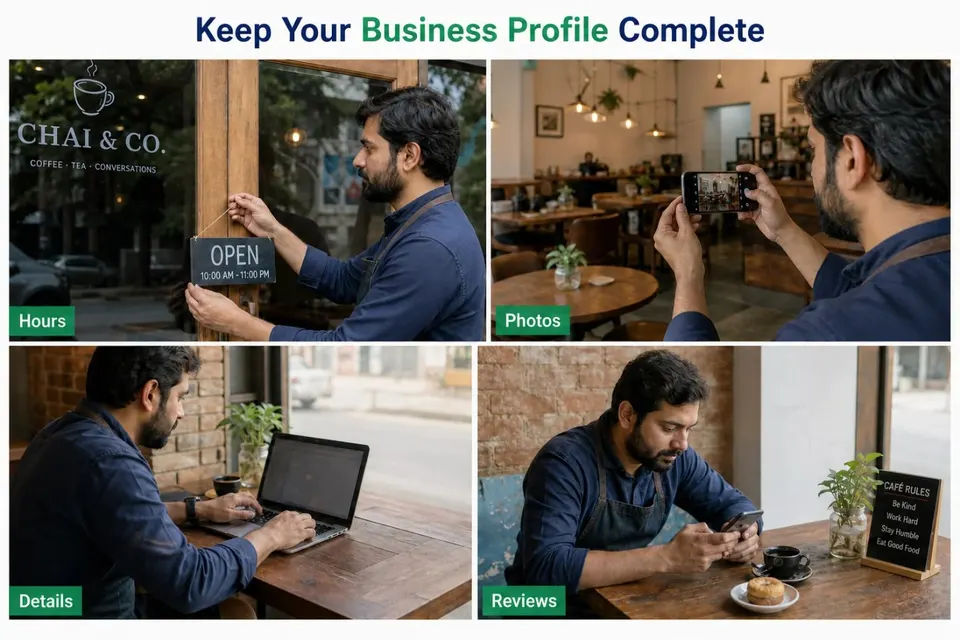
Complete every relevant business detail
Don't create the profile, enter a phone number and forget about it.
Review all relevant sections available to your business.
Depending on your category and location, these can include:
Business description
Opening hours
Special hours
Category
Address or service area
Phone
Website
Photos
Services
Products
Business attributes
Google also provides a Profile Strength indicator for verified profiles that can help identify missing information.
Write a useful business description
Your description should tell customers what the business actually does.
A simple structure works well:
Who you are + what you offer + who you serve + where you operate + what is genuinely distinctive about the business.
For example:
ABC Air Conditioning provides AC installation, maintenance and repair services for homes and businesses across Lahore. Our team works with major residential and commercial air-conditioning systems and provides scheduled maintenance and on-site repair services.
That's far more useful than:
BEST AC SERVICE!!! NUMBER 1 AC REPAIR IN LAHORE!!! CHEAPEST PRICE GUARANTEED!!!
Write for customers first.
Avoid keyword stuffing and make sure your description follows Google's current content guidelines.
The same principle applies to other places where your business appears online. If you are also building your Findoo presence, see our guide on how to write a business listing that converts.
Choose your categories carefully
Your primary category is an important description of what your business is.
Choose the closest available match to your main business activity.
Then add only genuinely relevant additional categories where necessary.
Think:
What is this business?
rather than:
What searches do I want to rank for?
Those are not always the same question.
Keep your opening hours accurate
Few things frustrate customers more than travelling to a business that Google says is open only to find it closed.
Update:
Normal business hours
Weekend hours
Holiday hours
Temporary changes
Special operating hours where relevant
Treat your profile as live business information, not a one-time form.
Add high-quality real photos
Photos can help potential customers understand what they can expect before visiting or contacting you.
Depending on your business, useful photos may include:
Storefront
Interior
Products
Services being performed
Team members
Equipment
Food and drinks
Rooms or facilities
Completed work
Use real photographs that accurately represent the business.
Photos should be clear, properly lit and in focus. Avoid excessive filters, misleading edits or AI alterations that make the image stop representing reality. Google provides additional photo and video guidelines for Business Profiles.
A beautiful photograph that misrepresents your actual business is less useful than a good, honest photograph of what customers will really experience.
Add products or services where available
If your Business Profile gives you the option to add relevant products or services, use it.
Don't make customers guess what you offer.
A salon, for example, can make its services clearer. A repair company can identify its main types of work. A qualifying retailer may have options to display products.
Available features can differ by category and region, so use the options Google provides for your particular profile.
Keep your phone number and website working
This sounds obvious, but it is easy to overlook.
Periodically check:
Does the phone number work?
Is somebody answering it?
Does the website load?
Does the website work properly on mobile?
Does the information on the website match the Business Profile?
Are opening hours consistent?
Discovery has little value if the customer cannot successfully take the next step.
Earn genuine customer reviews
Reviews can help potential customers understand the experiences other people have had with your business.
Encourage genuine customers to leave honest feedback after a real experience.
Do not buy reviews, manufacture them or pressure customers to leave only positive feedback.
And don't ignore the reviews you receive.
Respond professionally to both positive and negative feedback.
For a detailed strategy, read Online Reviews in Pakistan: Why They Matter, including how to request reviews and respond to negative feedback professionally.
How to improve your visibility on Google Maps
There is no legitimate button that guarantees the number-one position on Google Maps.
Google explains that local results are mainly based on three broad factors:
Relevance
How closely does the business match what the person is searching for?
Accurate categories and detailed business information can help Google understand your business.
Distance
How far is the business from the location relevant to the search?
This is one reason why creating false addresses or pretending to operate in multiple areas is not a sensible long-term strategy.
Prominence
Google also considers how well-known a business is.
Information available about a business across the web, links and reviews can contribute to this broader picture.
Google specifically notes that more reviews and positive ratings can help local ranking, although reviews are only one part of the overall system. You can read Google's explanation of how to improve your local ranking on Google for more detail.
The practical lesson is simple:
Don't try to “hack” Google Maps.
Build a real, complete and trustworthy business presence.
Google Business Profile and Findoo: why use both?
Google Business Profile and Findoo do not need to compete for the same role in your marketing.
They can serve different parts of your online presence.
Google Business Profile
For eligible businesses, Google Business Profile helps manage how the business appears across Google Search and Maps.
It is particularly important when people are already searching on Google for a business, service or location.
Findoo
Findoo is built around business discovery in Pakistan.
A Findoo listing gives a business another place where people can discover and learn about it, while Findoo's Digital Businesses & Online Services section also supports discovery beyond the traditional storefront-only idea of a business directory.
The goal should not be to depend on a single platform. A stronger approach is to build a complete online presence that helps customers discover and contact your business across multiple channels.
Think of your digital presence as an ecosystem:
Google Business Profile → Search and Maps visibility
Findoo → Pakistan-focused business discovery
Website → Your owned online presence
WhatsApp and phone → Direct customer communication
Reviews → Customer trust
Digital payments → Easier transactions
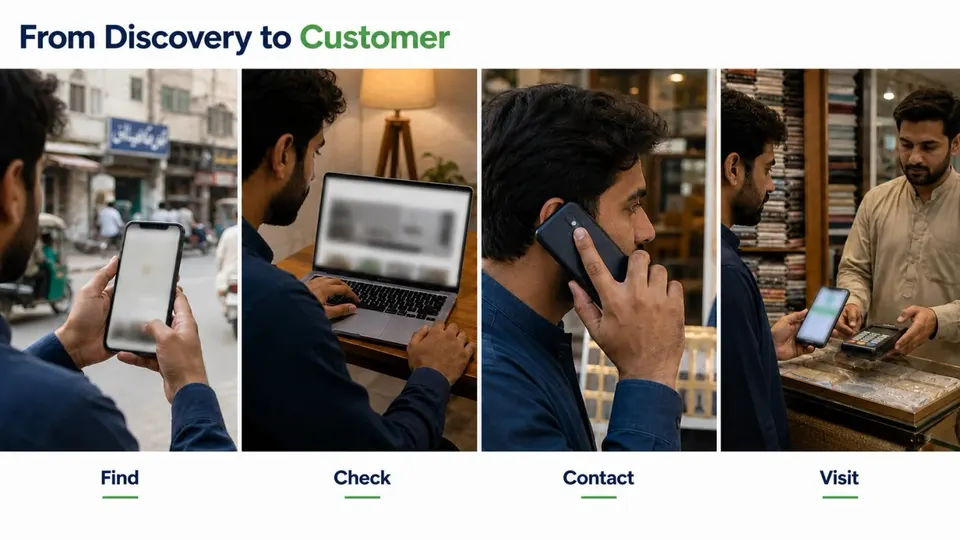
When these pieces support each other, customers have more ways to discover, evaluate and contact your business.
If WhatsApp is an important customer channel for your business, our WhatsApp Business guide for small businesses in Pakistan explains how to use it more effectively for customer communication.
For businesses accepting mobile payments, our JazzCash and Easypaisa business guide covers practical considerations for receiving digital payments in Pakistan.
Common Google Business Profile mistakes Pakistani businesses should avoid
A good profile is not just about what you add. It is also about what you avoid.
1. Creating duplicate profiles
Always check whether your business already exists before creating another profile.
Duplicates can create confusion for both customers and business owners.
2. Stuffing keywords into the business name
Don't turn your business name into an advertisement.
Use the genuine real-world name of the business.
3. Choosing irrelevant categories
Adding more categories just because they contain useful keywords can make the profile less accurate.
Choose categories that actually describe the business.
4. Using an address customers cannot visit
If you are a service-area business and customers do not visit your location, configure the profile accordingly.
Do not pretend to operate a storefront where one does not exist.
5. Forgetting to update business hours
If your opening hours change, update them.
Pay particular attention to holidays, Ramadan schedules, Eid closures and other temporary changes that can affect Pakistani businesses.
6. Uploading poor or misleading photos
Dark, blurry or heavily altered images can make it difficult for customers to understand the business.
Use clear, realistic images.
7. Ignoring customer reviews
A review is not just a rating.
It is customer feedback and, often, a public conversation about your business.
Respond professionally.
8. Using fake reviews
Fake reviews can damage trust and may violate platform policies.
Build your reputation through genuine customer experiences instead.
9. Forgetting the profile after verification
Your business changes.
Your Google Business Profile should change with it.
Check the profile regularly for:
Incorrect information
New reviews
Changed hours
Outdated photos
New services
Other information requiring an update
10. Giving away unnecessary ownership access
If an agency, employee or consultant helps manage your Business Profile, use Google's available access and management options appropriately.
The actual business owner should retain appropriate control of this important digital asset.
Google Business Profile checklist
Before considering your profile complete, check the following:
Business name matches the real-world name
Primary category accurately represents the business
Additional categories are genuinely relevant
Address or service area is correct
Phone number works
Website link works
Opening hours are accurate
Holiday and special hours are updated when needed
Business description clearly explains what you do
Real, high-quality business photos have been added
Products or services are completed where applicable
Business attributes are reviewed where available
Profile verification is complete
Customer reviews are monitored
Reviews receive professional responses
Business information is kept current
Don't treat this as a one-time checklist.
Review your profile periodically.
Frequently Asked Questions
Is Google Business Profile free in Pakistan?
Yes. Eligible businesses can add or claim a Google Business Profile at no charge. Advertising through Google Ads is a separate service and is not required simply to create a Business Profile.
Can I create a Google Business Profile without a shop?
Possibly.
If you operate an eligible service-area business and travel to customers rather than serving them at a storefront, you may qualify for a Business Profile.
Configure your address and service area according to how the business genuinely operates.
Can an online business create a Google Business Profile?
An online-only business that does not make qualifying in-person contact with customers is generally not eligible for Google Business Profile.
Online businesses should build visibility through appropriate alternatives such as their own website, social platforms and relevant business-discovery platforms such as Findoo's Digital Businesses & Online Services.
How long does Google Business Profile verification take?
There is no single verification time that applies to every business.
The method and process can vary depending on the business and the verification options Google provides. Follow the instructions shown for your individual Business Profile.
Why isn't my business showing on Google Maps?
There can be several reasons.
The profile may not be verified, information may be incomplete, changes may still be processing, the profile may not comply with Google's guidelines, or your business may simply not appear prominently for a particular search.
Also remember that Google determines local results using factors including relevance, distance and prominence. Having a profile does not guarantee a particular ranking.
Can I have more than one Google Business Profile?
Businesses with legitimate multiple locations may be able to maintain profiles for eligible locations under Google's guidelines.
That is different from creating several profiles for the same business at fake or duplicate addresses in an attempt to appear in more searches.
Should I use both Google Business Profile and Findoo?
For many eligible Pakistani businesses, yes.
They serve different discovery channels.
Google Business Profile helps an eligible business manage its presence on Google Search and Maps, while Findoo provides an additional Pakistan-focused business-discovery presence.
Your goal should be a consistent online identity across the platforms that matter to your customers.
Build a complete online presence for your business
Creating a Google Business Profile is a valuable step, but it should not be the only step.
Customers move between platforms.
They may discover you on Google, check your reviews, visit your website, look for your business on another platform, send you a WhatsApp message and only then decide whether to buy.
Make that journey easy.
Keep your information accurate and consistent wherever your business appears online. If you're creating or improving your Findoo presence, learn how to write a business listing that converts.
Use real photos.
Collect genuine reviews.
Respond professionally.
Make it easy for customers to contact you.
And make sure your business can be discovered in more than one relevant place.
If your business serves customers in Pakistan, create or improve your presence on Findoo and give potential customers another way to find you.
Comments
No comments yet. Be the first to share your thoughts.